Category: Technology

You can enter a simple description of this category here

  • The Future of Next-Gen Event Management App Development

    The Future of Next-Gen Event Management App Development

    The Evolution of Event Management

    The world of event management is rapidly evolving, and technology plays a pivotal role in shaping this transformation. With the increasing reliance on mobile apps for day-to-day activities, event organizers are now looking to streamline their processes, enhance attendee experiences, and maximize efficiency. A next-gen event management app offers just that, bringing advanced features and capabilities to the table that help businesses stay ahead of the competition.

    As the demand for more dynamic and customizable event experiences grows, businesses must turn to mobile app development services to build solutions that address the diverse needs of the modern event industry. This blog explores how the future of event management is shaped by next-gen mobile app development and the benefits it brings to event organizers and attendees alike.

    The Rise of Mobile-First Event Solutions

    With smartphones being an integral part of our daily lives, the importance of mobile-first solutions cannot be overstated. Today’s event organizers are shifting from traditional methods to mobile-based platforms, where all event-related processes—from registration to feedback collection—are handled on-the-go. These mobile apps enable event managers to keep everything under control, offering a more personalized and engaging experience for attendees.

    Mobile-first solutions also offer attendees the convenience of accessing event schedules, maps, and important notifications in real-time. By leveraging mobile app development services, developers can create user-friendly platforms that make event participation seamless. This shift towards mobile-first solutions is a game-changer for the industry, making it more efficient, scalable, and easier to manage.

    Key Features of a Next-Gen Event Management App

    When designing a next-gen event management app, several features need to be incorporated to meet the diverse needs of event organizers and attendees. Some of the essential features include:

    • Event Registration and Ticketing: An efficient and easy-to-use registration system is crucial for any event. A mobile app can offer online registration, automated ticketing, and easy payment gateways.
    • Interactive Event Agenda: Event schedules should be easily accessible, allowing attendees to view speakers, sessions, and activities in real-time. Attendees can also set reminders and create their personalized agenda.
    • Networking Opportunities: A next-gen app should provide networking functionalities, such as attendee profiles, matchmaking based on interests, and the ability to schedule meetings, making it easier for attendees to connect.
    • Real-Time Notifications and Alerts: Keep attendees informed of any changes or important announcements through push notifications, reducing confusion and ensuring smooth event execution.
    • Event Analytics and Feedback: Gathering attendee feedback and analyzing event data is essential for future planning. The app can offer integrated surveys and analytics to help organizers understand attendee satisfaction.

    By integrating these essential features, mobile app development services can help create an app that is versatile, user-friendly, and rich in functionality.

    Enhancing Attendee Engagement with Gamification

    One of the most exciting aspects of next-gen event management apps is the ability to engage attendees through gamification. Gamification involves integrating game-like elements into the event experience, such as earning points, unlocking badges, or competing in challenges. This not only makes the event more interactive but also increases attendee engagement and satisfaction.

    With the right mobile app development services, developers can build apps that include features like live leaderboards, point systems, and rewards programs. These features encourage attendees to participate in activities and make the event experience more enjoyable. Gamification also drives attendees to interact with exhibitors, participate in workshops, and visit different booths, which ultimately enhances the overall event value.

    Simplifying Event Management with Automation

    Event planning involves numerous repetitive tasks that can be time-consuming and prone to human error. A next-gen event management app can automate many of these tasks, freeing up time for event organizers to focus on higher-level responsibilities. This includes automated registration, session scheduling, attendee check-ins, and even personalized event recommendations for attendees.

    By incorporating automation features into the app, businesses can significantly reduce the administrative burden while ensuring smooth event execution. Using mobile app development services to implement automated processes not only improves efficiency but also allows organizers to handle larger events with fewer resources.

    The Role of AI and Machine Learning in Event Management

    As artificial intelligence (AI) and machine learning (ML) continue to advance, they are becoming key players in the future of event management. These technologies can be utilized to predict attendee preferences, optimize event scheduling, and offer personalized recommendations to both organizers and attendees.

    For example, AI-powered chatbots integrated into the event app can assist with attendee inquiries, provide real-time assistance, and even help with personalized session recommendations based on past behaviors. Moreover, machine learning algorithms can analyze attendee data to predict trends, enhancing event marketing efforts. By leveraging mobile app development services, developers can integrate these cutting-edge technologies to create more intelligent and efficient event management solutions.

    The Benefits of Cloud Integration for Event Management

    Cloud technology has transformed the way businesses store and manage data. For event organizers, integrating cloud solutions into event management apps allows for better data security, real-time collaboration, and easier access to event-related information across devices. A cloud-based app enables organizers to share documents, manage attendee lists, and store event data in a centralized, easily accessible location.

    Additionally, cloud integration allows for scalable solutions. As the event grows or more attendees sign up, the app can scale to meet the increased demand. Developers using mobile app development services can integrate cloud technology to provide a seamless, real-time event experience while ensuring data security and accessibility.

    Creating a Seamless Payment Experience for Attendees

    One of the most critical components of any event is the payment process. Whether it’s for event registration, tickets, or in-event purchases, a seamless and secure payment system is essential. A next-gen event management app should offer integrated payment solutions that allow attendees to pay quickly and securely via multiple methods, such as credit cards, digital wallets, or mobile payment apps.

    Furthermore, integrating features like digital receipts, automated refunds, and order tracking can enhance the user experience and ensure a smooth payment process. Working with mobile app development services can help businesses create an efficient and secure payment gateway within the app, improving attendee satisfaction and reducing friction.

    Tailoring Event Apps for Specific Needs

    Every event is unique, and as such, the event management app needs to be customizable to fit the specific needs of the event. Whether it’s a corporate conference, a music festival, or a trade show, event organizers should be able to adjust the app’s features to match the event’s theme and requirements.

    Customization options can include personalized branding, custom event schedules, or unique networking features that cater to the specific target audience. By leveraging mobile app development services, developers can ensure that each app is tailored to the needs of the event, creating a more impactful experience for both organizers and attendees.

    Conclusion

    The event management industry is undergoing a major transformation thanks to the rise of next-gen mobile app solutions. By incorporating innovative features like real-time notifications, automation, AI, and cloud integration, these apps are helping organizers deliver more seamless, engaging, and efficient experiences. Additionally, gamification, customization, and secure payment solutions are enhancing attendee satisfaction and engagement.

    As the demand for more sophisticated event experiences continues to grow, businesses need to partner with mobile app development services to stay ahead of the curve. By embracing the future of event management app development, event organizers can not only streamline their processes but also deliver unforgettable experiences to their attendees.

  • Why is the Red Light Flashing on My Insignia TV?

    Why is the Red Light Flashing on My Insignia TV?

    If the red light on your Insignia TV is flashing and the TV won’t turn on, it’s usually a sign of a problem. This guide will help you understand what might be causing the issue and how to fix it. We’ll explain in simple words so it’s easy for everyone to follow.

    Common Reasons for the Red Light Flashing

    1. Power Problems

    One of the main reasons the red light flashing on my Insignia TV won’t turn on is power issues. This might happen because of:

    • A loose power cord.
    • A broken power outlet.
    • Power surges or fluctuations.

    2. Remote Control Problems

    Your remote control might be the reason why your TV is not turning on. If the batteries are low or not working, it can cause the TV to stay off.

    3. Software Errors

    Insignia TVs run on software. If there’s an error in the system, the red light may blink. This can happen after a power outage or if the software needs an update.

    4. Hardware Issues

    If there’s a problem with the internal parts of your TV, it might not turn on. Common hardware problems include:

    • A damaged power board.
    • Faulty capacitors.

    5. Overheating

    Sometimes, your TV may shut off if it gets too hot. Overheating can damage the TV and cause the red light to flash.

    How to Fix the Red Light Flashing on My Insignia TV

    1. Check the Power Connection

    • Unplug the TV from the wall socket.
    • Wait for 5 minutes.
    • Plug it back in and try turning it on.
    • Make sure the cable is firmly connected.

    If the problem persists, try using a different power outlet.

    2. Inspect the Remote Control

    • Replace the batteries with fresh ones.
    • Make sure there’s nothing blocking the signal between the remote and the TV.
    • If the remote still doesn’t work, try using the power button on the TV itself.

    3. Perform a Power Reset

    A power reset can solve many problems. Here’s how to do it:

    1. Unplug the TV from the power source.
    2. Press and hold the power button on the TV (not the remote) for 30 seconds.
    3. Wait for 5 minutes.
    4. Plug the TV back in and turn it on.

    4. Update the TV Software

    Outdated software can cause the TV to malfunction. To update your TV’s software:

    • Go to the Insignia website using another device.
    • Check for the latest software updates for your TV model.
    • Follow the instructions to update the software.

    If you cannot access the TV menu, you may need professional help.

    5. Inspect for Overheating

    • Check if the TV is in a well-ventilated area.
    • Ensure that nothing is blocking the air vents.
    • Turn off the TV and let it cool down for 30 minutes.
    • After cooling, try turning it on again.

    6. Examine the Power Board

    If none of the above solutions work, the power board inside the TV might be faulty. You can check this by:

    • Opening the back of the TV (if you are comfortable with this).
    • Looking for burnt or damaged parts.

    ⚠️ Warning: If you’re unsure, call a professional technician.

    When to Call for Professional Help

    Sometimes, the problem is too complex to fix at home. Call a technician if:

    • The red light keeps flashing even after trying all fixes.
    • You hear strange sounds from the TV.
    • The screen remains completely black.

    Preventing Future Issues

    1. Use a Surge Protector

    A surge protector can prevent damage from sudden electricity spikes.

    2. Keep the TV Clean

    Dust can cause overheating. Clean the TV vents regularly with a soft cloth.

    3. Update the Software Regularly

    Check for software updates every few months to avoid errors.

    4. Avoid Overusing the TV

    Give your TV breaks to prevent overheating.

    FAQs

    Q: Why won’t my Insignia TV turn on even after a reset?

    A: If a reset doesn’t work, it could be a hardware problem. Call a technician.

    Q: Can a flashing red light mean the TV is dead?

    A: Not always. It usually signals an issue that can be fixed.

    Q: How much does it cost to fix an Insignia TV?

    A: It depends on the issue. Minor fixes cost less, but replacing internal parts can be expensive.

    Final Thoughts

    If the red light flashing on your Insignia TV won’t turn on, don’t panic. Start with simple solutions like checking the power and resetting the TV. If the issue persists, call a professional. With regular care and maintenance, you can prevent these problems in the future.

  • Online Conferences: Top Tips Organizers Should Keep in Mind While Planning Online Conferences

    Online Conferences: Top Tips Organizers Should Keep in Mind While Planning Online Conferences

    The popularity of online conferences is not unknown to anyone. In the past two years, one thing that has gained popularity vividly is online conferences. It is not that online conferences weren’t in use before the pandemic, people would connect over online platforms and communicate. However, it is during the pandemic that the majority of people came across this technique, and they are not the ones to be blamed.

    Talking of the present of online conferences, we all know how heavily organizations and corporations depend on virtual conference platforms for everyday requirements. It goes without saying that the remote workforce cannot function without online conferences. Given the popularity and dependence on everything virtual, it can be said that the end of online conferences is not anywhere near. Hence, you can host conferences virtually anytime without worrying about anything.

    Now, if you are hosting online conferences, or hosting them for the first time, here are a few things you should do. Experts suggest a few tips that, if considered, will help you seamlessly execute your online conferences and deliver a unique and valuable experience to your attendees. In this blog, we will discuss what those tips are. Hence, get ready to be on a fulfilling and learning journey with us. Read On.

    1. While Planning the Conference, Take Enough Time:

    Yes, it is true that virtual conferences are quick to plan and host. It is also true that you don’t need to spend that much time and effort on their planning. However, one thing you need to know as an organizer is hosting a conference is much more than simply sharing the link of an online conference platform. It goes beyond having some people over, and calling it an online conference. Though online conferences don’t demand that much time, effort, and money, it is an advantage. It should never become a reason for you not to prepare for it.

    Online conferences require some brainstorming and most importantly, a well-thought-out strategy. Hence, if you are planning a conference, don’t just sideline it by thinking that an online conference doesn’t require that much planning and preparation. The amount of time and strategy you will put into your conference will show up in the conference itself. Therefore, prepare and prepare well.

    1. Take Time Zones into Consideration:

    The next thing you should take care of is the fact that 6 pm in India won’t be 6 pm in the United States of America. The shift in time zones is a real thing. You need to be mindful of it while planning your online conferences. While online conferences give you the advantage of reaching out to a global audience at once, as an organizer, you should take advantage carefully. Several organizers end up overlooking or ignoring the time zones, which cost them the success of their conference.

    Hence, if you are targeting the audience of a particular country, make sure you schedule your conference accordingly. Nobody would like to attend a conference at 2 in the morning. Not only this, but you should also go through your calendars before deciding on a particular date. Make sure that the date you choose doesn’t coincide with another popular event. Also, make sure you don’t end up scheduling your conference for a national holiday or any festival.

    1. Deliver All Types Of Content:

    With our next tip comes another advantage of online conferences. It is that organizers get the complete freedom to deliver all kinds of content, be it live or pre-recorded. You can use it at per convenience and host sessions accordingly. However, experts suggest using both formats, and that is synchronous and non-synchronous content. While synchronous content enables you to boost audience engagement at the conference, non-synchronous content is more convenient for the audience.

    Both formats have their own advantages, and sticking to only one of the formats might not be that beneficial. However, if you mix and match the types of content, you will see the results yourself.

    1. Boost Audience Engagement and Networking:

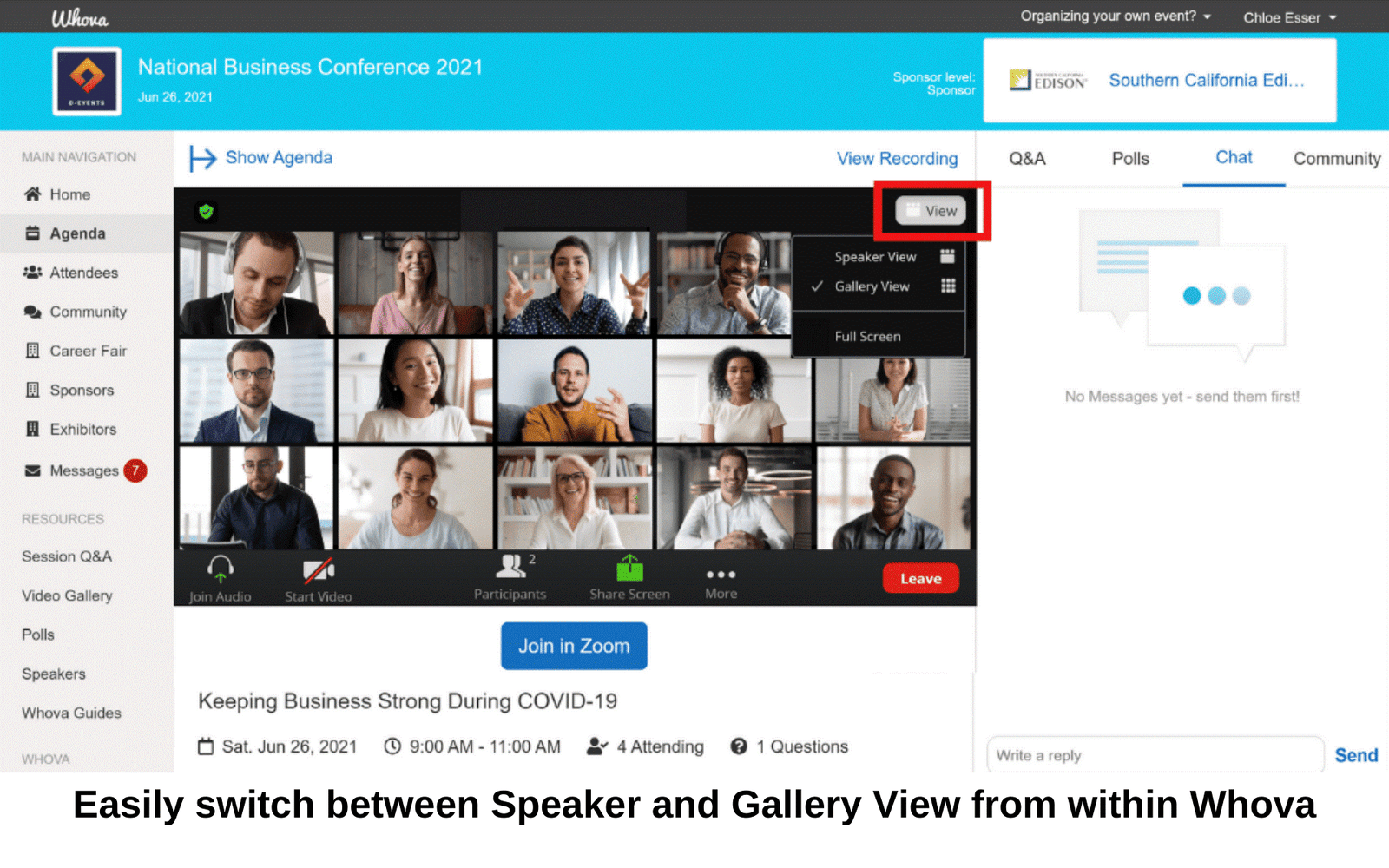
    The next tip you need to take into account while planning your online conference is providing the audience with engagement and networking opportunities. One of the most prominent misconceptions that people have regarding online conferences is that online conferences lack real-life experiences. Not only this, it goes without saying that networking is one of the biggest factors for people to attend such events. Now, if your conference doesn’t provide you with enough opportunities, would it even make sense for them to take out time and attend your conference? While you might think about how it is possible to provide attendees with networking opportunities, don’t worry. There are several online conference platform that come with several audience engagement and networking tools.

    Tools like audio-video chat, 1:1 chats, networking tables, and so many more help attendees interact with each other while being present at the conference.

    In addition to it, tools such as live polls, emoticon reactions, surveys, and so many other tools keep attendees engaged and hooked to the conference.

    1. Don’t Try To Achieve Perfection:

    One of the biggest mistakes that organizers end up making is trying to achieve perfection. While the conference is being held on a digital platform over some devices, the organizers are human beings. Making mistakes is completely human, and it is okay to make mistakes. However, if you have made a mistake while the session is going on, don’t try to overlook it or brush it under the carpet, your attendees have already noticed it.

    If something happens unintentionally and unexpectedly, make sure you handle it humorously. Accept that you have made a mistake, and try to get over it with humor. It won’t save you from making another mistake. And, it will also leave a good impression on your attendees and show your presence of mind.

    Since online conferences are so popular, every other organization is hosting one or the other every day. In such cases, you will become a part of the crowd if your conference doesn’t have anything unique to offer. Hence, keep the above-discussed tips in mind, and plan your conference accordingly.

  • Top 10 Flutter App Development Software

    Top 10 Flutter App Development Software

    Flutter’s rendering engine is simple and platform-specific. It can be used to implement many potentials for the mobile. Flutter’s performance is unrivaled by native app development. Flutter allows you to reuse the same code on multiple platforms, unlike native. Its hot features make it easy to check the compilation, the IDEs and tools that provide the required visual assistance, code completion, and debugging.

    Benefits of Flutter App development

    Flutter App Development is a great way to save time and rediscover the same app on another platform. A single UI and a single business logic can be used across all platforms.

    Flutter is a cross-app development tool that allows for faster prototyping and can be used to create MVPs. Flutter is for developers who want quick and easy development.

    You can use the following tools and IDEs to create a unique and custom application.

    Do not forget to watch your favourite latest movies here at 9xmovies green

    The Best Flutter Android App Development Software in 2021

    1. Count.ly

    Count.ly, an open-source analytics tool, is a privacy- and data security tool. The free version of Count.ly allows you to track the fundamental KPIs and metrics that show the operation of your app.

    A paid version of Count.ly offers additional metrics and exclusive features. Count.ly’s paid version can be hosted on-premise or in the cloud. Flags, push notifications and A/B testing are just a few of the features that can be found in the paid version.

    1. Supernova

    Supernova set up assistance for Flutter in Flutter Interact not long ago. This support helps you to create UI code for Flutter App development. Style handling – material widgets – can be used with UI code to bring ideas and tokens into Flutter App.

    Supernova can be run in parallel with a flutter application. The changes are made in real time. Flutter can be used as an export platform and is compatible with third party software like Adobe XD and Sketch. This allows you to change the UI design to production-ready codes.

    1. Panache

    Panache has been a trusted platform for android app development assistance.

    Panache allows you to create custom material themes for your apps. You can customize shapes, colors, and other properties of the Panache platform. These properties can be exported to Google Drive as a .dart file. You can also personalize your software by downloading themes and other materials.

    1. Test Magic

    Another tool you can use to test and deploy iOS and Android beta versions is Test Magic. Test Magic is available for free and allows you to download CI/CD on your connected devices.

    For better app functionality, you can collect and upload screenshots. Codemagic is compatible with Test Magic. You can add test gadgets and manage provisioning profiles for iOS development builds.

    1. Adobe Plugins

    Flutter Interact has declared a new plugin on the market as an event. This tool simplifies the work of the designer and developer. Adobe Plugin allows you to place code directly into your app codebase using Dat code. Adobe Plugins are a better tool for creating engaging apps.

    Activate foxsports com to watch latest sports

    1. Codemagic

    Codemagic is another reliable and efficient app development tool. Codemagic supports the Flutter framework to improve app-building processes. Codemagic makes it easy to bring an app to market. Codemagic offers an automated feature that allows you to quickly test and create a product.

    1. Instabug

    Instabug provides real-time contextual insight for mobile apps. Instabug can be used by developers to report in-app crashes, bugs, feature requests and surveys, without leaving the app.

    Instabug allows users to take screenshots and annotate or blur them as they wish. The tool can also collect details about the device and logs, which can be used to quickly identify and solve problems.

    1. Visual Studio Code

    Visual Studio Code is used by Flutter app developers to run tasks, version control and create, debug and test cloud and web applications. This open-source tool was developed by Microsoft and includes a free editor code that can be used on macOS, Windows, Linux, and MacOS.

    The lightweight, powerful tool provides smart code completion, syntax highlighting and code refactoring support. Visual Studio Code can be used with Python and C++, but it doesn’t support complex workflows.

    1. Android Studio

    This tool is used by many android app developers to develop flutter apps. One of the most useful IDEs for creating engaging and effective apps. Android Studio supports widget editing, syntax highlight procedures and code completion.

    1. Screenshots

    Screenshots is a powerful IDE to build flutter apps. It’s a command-line utility that does exactly what it says. This tool allows you to capture screenshots and upload them directly to the status bar.

    It integrates seamlessly into iOS and Android platforms. This makes it the best tool.

    The Nutshell

    Smartphones are an integral part of everyday life. Developers work hard to create intuitive and engaging applications. New tools and frameworks are constantly being developed to provide a fast, yet efficient solution. Flutter is a popular and efficient platform that developers love.

    These tools are some of the most promising, and they can be used with any platform or software. This makes them easy to market. These tools can be used to develop a huge and profitable flutter app.

  • Driving Digital Maturity through Digital Document Management System

    Driving Digital Maturity through Digital Document Management System

    Industry sources take Dave Rutkowski, CEO of Performance Improvement Partner’s a reference for defining digital maturity as comprehensive. According to him, digital maturity is the ability of the organizations to respond quickly to take advantage of opportunities in the market based on current tech stacks, staffing resources, and digital technology. 


    Digital maturity is nothing but an initiative to transform digitally integrating technology, people, workspace, and the work culture. Although there is no pre-defined digital maturity model that suits companies at large, organizations can use digital maturity models to shape their needs to drive business growth and success by refining the nosiness process in every aspect.

    According to several worldwide studies, 63% of companies globally have initiated digital transformation earlier than expected by 2020, thanks to the sporadic outbreak of the pandemic globally. 85% of the companies have geared up digitally to enable employee interactions and collaborations. 97% of the global IT directors have said that the COVID has accelerated digital initiatives in 60% of the companies. 

    According to Deloitte, 43% of companies with accelerated digital transformation could reap the benefits than the industry averages.

    Digital maturity does not mean investing heavily in digital technologies. Attaining digital maturity is nothing but assessing the organizational abilities and the current state of digital capabilities to drive operational productivity. Digital maturity offers a roadmap for the organization to emerge out of the shortcomings to facilitate the below-mentioned objectives;

    • Access
    • Automation
    • Customer-centric
    • Efficiency
    • Flexibility
    • Innovation
    • Operational efficacy
    • Insight
    • Quality

    It is interesting at this juncture to observe how electronic document management systems embedded with analytics and electronic signature features drive digital maturity.

    Instant Access to Documents

    Access to information is the key to success in the data-driven platform environment and the document management tools are cloud-native platforms that offer immediate access to documents to multiple stakeholders, who need not wait for the email transaction to access documents. Companies can provide access to electronically signed documents to the intended customers safely, honoring the international privacy norms with a digital seal. Customers can get access to a tamper-proof document instantly.


    Workflow Automation

    Electronic signature software embedded with the document management system automates the workflow of industries in manufacturing, logistics, banking, insurance, healthcare, and more. An automated digital workflow in an educational sector streamlines student application, onboarding students, and issuing the student transcripts, and certificates online with a digital seal and a legally valid electronic signature.

    Customer-Centric to Promote Convenience

    Companies can drive digital maturity by building an efficient digital ecosystem at every stage of their operation, including production, supply chain, delivery, sales, customer service, and post-sales using a digital document management platform. Companies can create customized documents with their logo on the backdrop as a watershed mark. Companies can serve their B2B and B2C customers by instantly exchanging documents and information, eliminating lethargy and uncertainty in signing sales deeds, rent agreements, new project deals, vendor agreements, and third-party agreements. A document management system aids companies in serving customers in a more personalized manner.

    Enhanced Efficiency with Digital Work Environment 

    Companies can drive efficiency, promoting a paperless, digital work atmosphere. A document management system preserves company agreements, trade contracts, employees’ data, and inventory in a central repository by allocating a digital indexing number to each file. Document management system facilitates digital archiving and retrieving of data and documents within no time to avoid mismanagement and file tampering. Since companies can sign all the documents officially, using an electronic signature to facilitate digital audit trials to enhance customer loyalty by serving clients efficiently.

    Remain Flexible, Swift, and Agile.

    Organizations can act swift and agile by switching to a digital environment to provide an enhanced customer experience that is highly integrated and efficient. Electronic signature tools embedded with a document management system are perfect on the cloud or office premises. The small, medium and large industries can deploy this tool to automate their workflow and daily office routine.

    Innovation Personified as Electronic Signature Tool 

    The electronic signature tool can be seamlessly integrated with analytics and e document management system to integrate data from various departments within the company and outside to build a powerful dashboard to design marketing, sales, media, and branding strategies to drive growth and success.

    Enhanced Operational Efficiency

    Companies can help employees focus on being more productive by reducing time spent on manual data filling and repetitive paper and documentation work. Organizations can also save time, cost, and efforts on paper-based documentation of agreements, trade contracts, sale deeds, and manual processing of data. Companies can create documents with customized templates. Companies can import data from the devices, automatically. They can save money spent on printing, scanning, photocopying, and dispatching documents to various global destinations instantly. Multiple recipients and stakeholders can get access to the documents straightaway from the cloud.

    Customer Insights to Provide Personalized Customer Services

    Electronic signature tools are embedded with AI analytics to draw inferences on customer behavior. Companies can use this information to design products and services that customers wish to buy. Companies can design successful campaigns to reach customers with effective marketing communication with the inputs in hand. Digital transformation is taking the industries by storm. Companies can meet customer expectations by shifting to cost-effective software tools to build a digital environment at an affordable cost.

    Enhanced Product or Service Quality

    A bank or an insurance company can save at least 80% of the turnaround time spent on the traditional operation system for opening bank accounts or settling insurance claims. Hospitals can streamline the patient health records to store in the central repository for the doctors to access them for issuing digital prescriptions or clinical diagnosis reports. The hospitality sector can sign vendor agreements remotely using any device, including a mobile phone to offer efficient customer services like reserving hotel services, customer onboarding, and checkout.

    Conclusion

    Digital maturity does not mean organizations investing heavily in all the latest digital technologies. Digital maturity helps companies to assess their position in the marketplace to drive strategies to enhance operational efficiency to enhance customer expectations. Electronic signature software builds the essential digital ecosystem to enhance employee productivity. Organizations can shift to the digital document management system to streamline mail communication, workflow, and document management to enhance quality. Companies can integrate this software with the existing technologies in use to increase operational efficiency and productivity to drive growth and success.

  • Easy ways to edit product photos

    Easy ways to edit product photos

    Easy ways to edit product photos

    If you’re like most product photographers, you spend a lot of time editing your photos before uploading them to your website or selling your products. Here are 5 easy ways to improve the look and feel of your photos: 

    1. Adjust the brightness and contrast of your photo.
    2. Use a filter to add a creative effect.
    3. Change the background color of your photo.
    4. Try cropping your photo to make it look sharper.

    How to take great product photos?

    Looking to take your product photos to the next level? Graphic Design Eye suggests a few easy ways to improve your photography skills.

    1. Use natural light whenever possible. This will help create a more realistic-looking photo.
    2. Shoot in high resolution. This will allow you to save your photos and make them look sharper when edited.
    3. Take multiple shots and choose the best one for each angle. This will help you capture all of the features of your product in a single photo.
    4. Use filters and effects to add interest or impact to your photos. These can be found online or in dedicated photo editing apps like Adobe Photoshop or GIMP.
    5. Consider using stock photography or images from other sources as inspiration for your own shots.

    How to make your product photos look great without any Photoshop skills?

    Looking to take your product photos to the next level without any Photoshop skills? Here are 8 easy ways to make your photos look great without any extra effort.

    1. Use natural light: Product photos taken in natural light look much more professional than those taken under artificial lighting. Try heading outside for some shots or using a large window as your backdrop.
    2. Change up your angle: If you’re having trouble getting good shots from straight on, try tilting or rotating your camera to get different angles that will show off your product in a more flattering light.
    3. Shoot in black and white: This gives your photos a vintage feel that can really set them apart from the competition. Just be sure not to overdo it – too much B&W can make photos look gritty and unprofessional.

    How do I edit a photo?

    There are a number of ways to edit product photos, depending on what you want to achieve.

    Some easy ways to edit product photos include using free online photo editing tools or apps, or using basic photo editing software that comes installed on most computers.

    If you’re looking for more advanced features, there are also software options that offer more editing capabilities, including tools for cropping, adding text, and adjusting colours.

    Whatever method you choose, make sure to take the time to fine-tune your photo edits until they look exactly the way you want them to. You’ll be happy you did!

    How do I crop a photo?

    There are a few easy ways to edit product photos. One way is to use photo editing software like Photoshop or GIMP. You can crop the photo, adjust the brightness, contrast and color, and add filters. Another way is to use a photo editing app on your phone. You can crop the photo, adjust the brightness, contrast and color, and add filters. Finally, you can take a picture with your phone and just post it online.

    What tools do I need to edit photos?

    Looking to quickly and easily improve your product photos? Here are a few easy ways to get the job done:

    -Scan or take digital photos with a smartphone or camera.

    -Use an online photo editor like PicMonkey, Adobe Photoshop, or GIMP.

    -Use an app like Shutterfly Photo Planner to create templates for your product photos.

    -Upload your photos to a photo sharing site like Instagram, Flickr, or Facebook.

    How can I edit photos of my products?

    There are a few easy ways to edit photos of your products. You can use photo editing software like Photoshop or GIMP, or you can use online tools like Picasa. Each has its own features and advantages, so it’s up to you which one you prefer. Here are some tips on how to edit photos of your products:

    1. Choose the right photo editor. If you’re using software such as Photoshop or GIMP, be sure to choose the correct program for the job. Photoshop is good for fixing mistakes, while GIMP is better for creating logos and graphics.
    2. Use layers. Layers are great for editing photos, because you can easily change the opacity (thickness) of each layer without affecting the other layers below it.

    Can I edit the product photos on this website?

    Do you want to make your product photos look their best? Editing them can be a lot of work, but there are a few easy ways to get the job done. Here are four tips for editing product photos:

    1. Use software. There are many photo editing programs available online and in stores. Google “photo editing software” to find several options. Some of the most popular programs include Adobe Photoshop and GIMP. If you don’t have access to a photo editor, you can also try online tools like Fiverr or 99Designs.
    2. Use filters. Filters can help you change the look of your photos without having to edit them extensively. Many photo editing programs offer built-in filters, but there are also many free filters available online.

    What is the best way to edit a product photo on this website?

    There are many different ways to edit product photos on this website. Some people prefer to use photo editing software, while others prefer to use online tools. Here are some easy methods that you can try:

    1. Use photo editing software: Many people prefer to use photo editing software because it’s more efficient and it offers a wider range of features. However, not all photo editing software is created equal, so it’s important to select the right one for your needs. Some of the most popular photo editing software include Photoshop, GIMP, and Adobe Photoshop Elements.
    1. Use online tools: Another popular way to edit product photos is to use online tools such as Canva or PicMonkey. These tools offer a wide range of features and they’re easy to use. Plus, they’re free!

    What are some easy ways to edit product photos?

    Some easy ways to edit product photos are using photo software such as Photoshop, GIMP, or Adobe Photoshop Elements. Another way is to use online photo editors such as Pixlr.com or Canva.com. There are also free photo editing tools available such as PicMonkey and Google Photos Editor.

    What are the differences between using a photo editing software and using a website to edit photos?

    Photo editing can be a daunting task for the average person. However, with the help of some easy software options and websites, anyone can edit their photos to create a great product photo. Here are three of the best ways to do it:

    1. Use a photo editing software. Photo editing software like Photoshop or GIMP allow users to make basic adjustments like brightness, contrast, and color. They also have filters that allow for more creative edits.
    2. Use a website like Pixlr.com. Websites like Pixel offer users simple drag-and-drop tools to edit photos right on their website. This is great for people who don’t have access to photo editing software or want something quick and easy without all the bells and whistles.
    3. Combine methods 1 and 2.

    What is the difference between high-resolution and low-resolution pictures?

    Are your product photos looking a little outdated? There are a few easy ways to make them look fresh and new. Here are 8 easy ways to edit product photos:

    1. Use high-resolution images for the best results. For example, if you’re using an image that’s been scanned in from a physical product, use a higher resolution photo to create a sharper image. This will give your photo a more professional look.
    2. Update the lighting and environment. If your product photos are taken in a dark setting, light up the scene for increased realism. If they’re taken in an artificial environment, try changing the background or adding some props for added effect.
    3. Use filters and effects to give your photos a unique look.
  • Undetectable Keylogger for Android: Never Compromise On Gadget Safety were attacked

    Undetectable Keylogger for Android: Never Compromise On Gadget Safety were attacked

    The IT department called for an emergency meeting and that’s when they broke the news. Turned out some of our systems were attacked. It was bad news as we are working on some very important projects and we could not afford data leakage at that time. One of the new employees’ systems was attacked and hacked and they asked for money to give back the control. Thankfully our management team worked hard and got the system back within no time but it was a fair warning. So a meeting was called and the higher authorities asked for options to increase the security of the gadgets. Dozens of kinds were shared but one of them, in particular, got the attention of many. It was the use of employee monitoring apps to keep a check on the inside and outside of the workplace. At first, it was taken as some sort of big complicated plan that will demand a huge budget and will be a long process. One of the teams was given the responsibility to research the best software and manage everything beyond. They presented a detailed report about how one can enhance the overall safety and security in bug organizations. The spy app offered features like screen monitoring, undetectable keylogger for android, email monitoring, mac and Windows gadget monitoring, and more.

    From choosing the app to installation and bundle deals and how to handle the employee monitoring here is your step to step guide.

    What Is Keystroke Logging:

    Keystroke logging is a recording of all the keypad activities of the target with the help of the keystroke logging feature app. Undetectabletabel keylogger for android makes it possible for the employer to know about all the keypad-related activities of the employee. You can know pretty much everything about your employee through this single feature. The One Spy offers many other features as well. Together it becomes the best choice for keeping an eye on the work-related activities of the employee.

    Track Weak Password/Credentials:

    The keystroke logging feature allows the user to track any employee who has set a weak password for the official device. The feature keeps a record of all the passwords related to the particular device. In case of any loophole, the user can warn the particular employee and can avoid any potential attack timely.

    Secret Account Information:

    In case the threat is from inside and any of your employees can be a potential spy then you can catch them as well with the help of the The One Spy spy app. The Undetectable keylogger for android lets the user know about any secret account information as well. You can not only know about the secret account but the passwords as well. Thus track any potential insider threat and punish them. There should be no compromise on the safety and security of the data.

    Stop Unconscious Leaks:

    Many of us suffer from bad habits. So many people save important credentials in their gadgets. This could be in text form, a note on a notepad, or any other thing. The point is important passwords are sometimes saved on the same gadget and that can be a risky move. Track any employee who can be a potential loophole for any outside attack. As malware can hack the whole system and that can be dangerous for all the employees and the organization. Know about the keypad-related activities so after employees and track any such activity right away with the keylogger feature.

    Passwords Must Not Be shared:

    People tend to share their official gadgets with other colleagues thinking it is not a big deal. But the point is sometimes this type of activity becomes the base of any outside attack. With the help of Undetectable keylogger, android users can know sharing of gadgets among employees. Track password or account details sharing in emails, and messenger apps and warn the involved parties right away.

    TheOneSpy spy app offer employee monitoring feature in economical bundles. Why choose the app because

    • It has a user-friendly interface
    • They offer three types of bundle
    • The installation process is very simple and easy
    • They had this stealth mode. That made it possible for the employer to make employee monitoring a secret mission or an obvious thing.
    • The variety of features that fits perfectly for employee monitoring make this app one of the best app for this goal.
  • 7 Ways How to Use WhatsApp Reactions, 100% Successful

    7 Ways How to Use WhatsApp Reactions, 100% Successful

    In recent days, the WhatsApp message reactions feature has become the talk of users because the WhatsApp reaction feature looks very cool and can be used when you send messages on WhatsApp.
    The WhatsApp reaction feature itself is a feature to give a reaction to a messages that other users send to you. WhatsApp reaction are in the form of emojis but not all of them will appear, only a few.
    Of course, this WhatsApp reaction feature is very suitable for use when you don’t want to reply to the message by typing. In addition, if you are an Android smartphone user, you can still react to WhatsApp message on Android.
    How to react on WhatsApp message on Android or how to use reactions on WhatsApp is very easy. Although the WhatsApp reaction feature is not yet available in all countries, we can still use other methods.
    To learn how to use WhatsApp reactions, you must really understand the steps, here I show you all.

    How to Use WhatsApp Reactions

    1. Access your WhatsApp application on Android or other.
    2. Open one of the messages you want to react on WhatsApp.
    3. Press and hold the message.
    4. To use the reactions in WhatsApp messages, press the left arrow icon to the left of the star icon.
    7 Ways How to Use WhatsApp Reactions, 100% Successful
    5. Tap the emoji icon.
    6. Select the emoji that you will use for reactions on WhatsApp messages.
    7. If you have, you can start sending the message.
    How to use reactions on WhatsApp as above looks like it doesn’t use the WhatsApp reaction feature, right. Yes, that’s right, because once again I tell you that currently not all countries can use the reactions feature in WhatsApp messages.
    So this is the only way you can start react on WhatsApp message on Android or so on. If you really want to use it in general then you have to wait until the WhatsApp reaction feature has been officially released in your country.
    That’s how to use WhatsApp reactions. You have to really study it so that there are no steps that make you confused and also so that you don’t ask again about it.
  • The Best Phone Number Finder Tools In 2022

    The Best Phone Number Finder Tools In 2022

    What Is A Phone Number Finder Tool?

    A mobile number finder tool is software that finds, scrapes, and exports mobile numbers from websites, search engines, and local files and saves them in an organized CSV or Excel file for future use. A phone number search tool does not require repetitive typing or copy-pasting and has a wide range of filters to get a necessary and real phone number database. Extracted phone numbers from websites can be used for purposes in various fields like telemarketing, SMS marketing, freelancing, recruiting, digital marketing, etc.

    The Best Tools To Find Phone Numbers Marketing In 2022

    A mobile number hunter tool often refers to an important part of a successful mobile marketing campaign that extracts mobile numbers from websites without any programming and human efforts. A phone number scraper not only scrapes real phone numbers from multiple websites simultaneously but also exports them in an Excel, CSV, or Text file for use. There are billions of websites on Google and other search engines – they all share their contact information publicly to contact them and you can’t scrape this data manually. You have to use an automated mobile number extractor for this purpose. A Phone Number Extractor is compulsory for those who need bulk phone numbers for mobile marketing and freelancing projects.

    Now we know the definition of a phone number finder tool, I am going to further share a list of the top 2 Email scraping tools.

    1. Cute Web Phone Number Extractor

    As one of the best phone number data collection tools in the market, Cute Web Phone Lead Extractor is developed for both coders and non-coders to collect phone numbers for telemarketing and freelancing projects.

    Cute Web Bulk Phone Number Extractor also provides an intuitive point-and-click interface and supports dealing with infinite scrolling, log-in authentication, text input (for scraping search results), as well as clicking through drop-down menus. Extracted phone number data can be exported in Excel, CSV, Text, or other formats. If you want to scrape phone numbers for a specific industry or country, you can put your keywords in the search bar of the Phone Number Finder Tool and it will automatically find all the results related to your keywords from Google and then you can extract these search results to use them.

    There are many video tutorials and articles available for everyone to understate the working of the WhatsApp Number Extractor.  If you are tight on budget and time and tired of copy-paste bulk phone numbers on a daily basis, Phone Number Scraper may be a good alternative to consider. You can use the Phone Number Crawler software for 3 days free, but cannot export phone numbers to your computer. To enable the data export option, you have to purchase the license of the phone number extractor software for only 59.99$ for a complete year.

    1. Top Lead Extractor

    Top Lead Scraper is another coding-free desktop application in the market to scrape emails and phone numbers from websites and local files, supporting all versions of windows. Without any programming skills, Web Contact Extractor can extract and export website emails, phone numbers, and social media links to Excel, CSV, or Text files.

    Email and Phone Number Finder has many handy features that help the user to find, scrape, export, and organize data automatically from thousands of websites at a time. You can find prospects’ data by business or person name, zip code, mobile company code, and categories also. You can use the Top Lead Extractor free for 3 days with a disabled export option. You can enjoy the license of Top Lead Extractor for one year for just $79.99.

    Final Words:

    If you are a business owner or a telemarketer then these tools help you to find customers’ and business partners’ phone numbers for any country and industry without coding. If you are a freelancer then you can use these phone number scraping tools to complete their phone number lead generation projects. These mobile number finder tools can find phone numbers for almost all countries, areas, and industries.

  • What’s A Good Processor Speed For Laptop

    What’s A Good Processor Speed For Laptop

    In any PC, the two rule parts RAM and Processor recognize gigantic parts. Notwithstanding, by and large, people become confounded about what makes A PC speedier with RAM or Processor?. Here in this article, we will look at the control of RAM and Processor in your PC and what makes a PC speedier than RAM or Processor. In any case, going prior to discussing in a general sense first, you need to get a handle on the capacity between RAM V/S processors. So we ought to start from the beginning,

    What is RAM?

    Hammer is a PC’s transient memory and it watches out for sporadic access memory which is used to manage each fascinating task and application. The pound is a kind of memory that stacks and stores headings from colleague memory. Discretionary memory organizes SSHDs, SSDs, and HDDs.The Central Processing Unit (CPU) lines the standards for execution at whatever point they are stacked into RAM. It is generally, a staggering decision since it speeds up the showing of your PC, and more RAM recommends that additional programming types can be stayed aware of. It outfits PCs with the virtual space they want to regulate information and tackle issues continuously.

    How really does RAM answer?

    Hammer is a kind of vaporous aggregating that disappears when the power is turned off. At any rate, what is the inspiration driving RAM used for? It’s fast to the point that workstations are really working on things like, for instance, the application you’re now running, the web program in which you’re analyzing this article, and the data those applications work on or with like this article.


    Hammer is where your PC stores the data that licenses it to play out its most immense tasks, for instance, stacking applications, exploring regions, and evolving records. Since your PC can point of truth notice the data in its transient memory, RAM grants you to quickly open applications and records. Keeping the information you however much of the time as could reasonably be expected go through exceptionally close velocities your PC’s grandstand.

    Sorts of RAM

    There are various types of RAM. Lessen energy use while additional making rate and cutoff Scientists are perpetually investigating these appraisals. Clients had the decision of static RAM (SRAM), dynamic RAM (DRAM), or synchronous strong RAM (SDR) by the last piece of the 1990s and mid-2000s (SDRAM). DDR-RAM is the most overwhelming sort nowadays, and there are a few ages, including DDR2, DDR3, DDR4, and DDR5. DDR is a shortening for a twofold data rate, which ponders made sharing out of reports at the same time.

    What is Processor?

    The reasoning equipment that responses and cycles the central norms that drive a PC is known as a processor (CPU). The CPU is seen as the standard and most fundamental made gear (IC) chip in a PC since it is responsible for loosening up the majority of the PC’s requesting. Focal processors play out a gigantic piece of major finding out, thinking, and I/O attempts, as well as giving sales to various chips and parts in a PC.

    How does Processor answer?

    A PC’s processor is identical to the human frontal cortex. Nothing would happen and your PC wouldn’t work without it. The PC, like your frontal cortex, gets and processes data and produces the fundamental outcomes to keep your body working fittingly (consider how when you get invigorated and your body begins to offer traces of hankering, for instance, your stomach begins to harm and you get the impression of wanting to eat food). Essentially, your CPU processes all of the data that moves through your structure or comes into contact with it to a great extent or another.


    A processor is a get-together of stuffed parts that cooperate to pass on data. The processor allows your PC to complete the responsibility you request when you open an application or make changes to an archive The speed with which it cycles can basically affect your enlisting experience.

    How does a Processor work?

    A CPU is confined to three stages. It begins by exploring the direction from RAM. The CPU then loosens up the course to pick its significance. Finally, the course is executed by the CPU. All of this ought to be done as quick as possible as you progress from attempts like gaming, working, or genuinely looking at messages. A speedier CPU will attract you to change attempts fast and with no impedance to speeds.

    Kinds of Processor

    ICs today are regularly multi-focus, construing that they contain something like two processors for more capable treatment of various tasks immediately, consume not such a ton of power, but rather more unquestionable execution. The vast majority of PCs have someplace in the degree of two and four focuses, yet this number can increment to as much as twelve. Certain multi-hung processors have virtualized processor focuses.

    RAM V/S Processor-Difference among RAM and Processor

    Concerning PC choices, the two most monstrous parts are the CPU, overall called the processor, and the RAM, all around called memory. We sort out what makes a PC’s RAM or Processor speedier by seeing their assortments.


    • The essential capacity of RAM and CPU is the positions they play on a PC. The CPU is the true selecting part, regardless, RAM basically stores data, and by creating RAM structure execution increases.
    • The CPU is the authentic part that shuts the overall system speed as it processes data.
    • Data and heading are managed in RAM when the CPU needs that data then, at that point, RAM gives that data. Hold memory had some awareness of decreasing idleness while getting to RAM.


    1. Affiliation Parameter RAM CPU
    2. Withdrawal for Random Access Memory Central Processing Unit
    3. Execution Scale The number of tasks running concurrently The speed with which a program can be shipped off
    4. In a general sense
    5. Function Memory is set something to the side for programs that are at present running Memory is figured out how to finish the program
    6. Use at idle 0.5 0.8-10%

    End

    In this article, we discussed what is RAM and what is processors and their divisions. The overall show of a phone or not perpetually set up by how well the CPU and RAM coordinate.

    Coincidentally, taking into account how the processor is the frontal cortex of the PC or PDA, it could partake in an advantage over RAM. Right when a fast processor is connected with more RAM, errands become more responsive. I need to recognize that you sort out What Make A Laptop Faster RAM Or Processor? By doing their capacity. Enduring you feel somewhat cautious or requests you can contact our Support Team. They will help you.