Blog

  • Impact Of AI On The Taxi Booking Industry – A critical insight

    Impact Of AI On The Taxi Booking Industry – A critical insight

    Artificial intelligence was merely a concept assimilated in the 1950s by the young British polymath who introduced artificial intelligence as a mathematical possibility. Making it more straightforward, artificial intelligence holds the ability to make machines perform tasks that showcase the replication of humans and animals. 

    We all are indeed undergoing a digital revolution, and everyone in the world is contemplating the AI-based process. The concept of AI might just be a mathematical theory, but currently, this AI has been ruling the Z Gen.This is one of the top reasons why every industry is getting more inclined towards the world influenced by artificial intelligence. Another surprising fact about the impact of AI on the taxi booking industry is that many giants have gone through tremendous growth in their businesses due to AI infiltration. 

    On the other hand we have also encountered a significant number of investments being made in the automotive industry. The majority of these investments are focused on artificial intelligence (AI) and self-driving technology improvement. In the meantime, new mobility systems and players are gaining traction in the car industry. Tesla is working to improve its autopilot system, Uber is experimenting with robo-taxis, and Google is working on self-driving vehicles.

    The global market for AI in transportation is estimated to reach 3.5 billion dollars by 2023, according to estimates. Let’s take a quick look at some real-world AI applications in transportation.

    AI in transportation: The applications 

    AI applications in transportation demonstrate why the market is booming and why businesses should utilise the technology. Take a look at the following examples of possible applications:

    Vehicles that drive themselves

    Autonomous vehicles are one of the most ground-breaking AI applications. Autonomous vehicles, which were previously only a sci-fi fiction, have now become a practical reality. Despite the fact that many people were suspicious of this technology during its early stages of research, driverless vehicles have already entered the transportation sector.

    In Tokyo, self-driving taxis have already begun to operate. However, for safety reasons, the driver currently sits in the car to take control of the taxi in the event of an emergency.

    Controlling traffic

    Traffic congestion is another transportation issue that people confront on a daily basis. AI is now poised to fix this problem as well.

    Sensors and cameras embedded in the road surface collect a massive amount of traffic data. This data is then transferred to the cloud, where big data analytics and an AI-powered system will be used to analyse and reveal traffic patterns. Data processing can provide useful insights such as traffic predictions. 

    Important information such as traffic forecasts, accidents, and road closures can be delivered to commuters.Furthermore, people can be notified of the shortest path to their destination, allowing them to travel without traffic congestion. AI may be utilised in this way to not only eliminate unnecessary traffic, but also to improve road safety and shorten commute times.

    Predictions of delays

    Flight delays are another pressing issue in today’s aviation. According to a study undertaken by experts at the University of California, Berkeley, the projected costs of aircraft delays in the United States are 39 billion dollars. Flight delays have a detrimental influence on passengers’ flying experiences, in addition to financial losses.

    Negative flying experiences can devalue a transportation company’s value, resulting in higher client attrition rates. To address these difficulties, artificial intelligence (AI) comes to the rescue of the airline sector.

    Taxis driven by drones

    A drone taxi is one of the most intriguing and innovative AI uses in transportation. Pilotless helicopters offer a one-of-a-kind option for reducing carbon emissions, traffic congestion, and the requirement for costly infrastructure investment plans. Furthermore, drone taxis will allow individuals to get at their location considerably faster, reducing commuting time.

     Furthermore, rising population pressures have put city planners under a lot of strain to ensure wise urban planning and infrastructure development while also conserving scarce resources. Drone taxis may be the true solution to all of the issues that these city planners are attempting to address.

    Benefits of AI-Powered on Demand Services Like Taxi Apps

    In the cab-hailing and transportation industries, startups are using AI to create smarter systems. In the shape of an AI-enabled taxi dispatch software, one significant application case has arisen.

    A taxi dispatch system with artificial intelligence (AI) could be a game-changer. It enables startups to improve operational efficiency while also promising a better consumer experience.

    Artificial Intelligence (AI) Enables Smart Business Decisions

    With the support of data-driven analytics, business operators may make wise and well-informed decisions. It performs a quick, accurate, and comprehensive analysis of past trends based on client behavior and service demand. Following that, they can use AI technology to make business decisions based on trends. 

    Furthermore, you can employ predictive analysis to give recommendations to your consumers. An important factor to consider when it comes to making income from on-demand service apps.

    App Personalization for a Better User Experience

    What separates an average on-demand service app from a very successful one is the ability to customize apps to meet the needs of clients. It allows consumers to easily customize the information, material, and special offers they receive based on their needs. Business operators, on the other hand, have complete control over the user’s location, active time, and information about the platform’s most popular users. 

    Using such vital information, company owners can send unique offers to users during times when they are most active, hence increasing user involvement with the app.

    Smart Driver Onboarding Process 

    It is true that with the help of AI-based services, the level of automation and convenience is reaching new heights. Combining artificial intelligence and taxi dispatch solutions brings out an impressive experience for the operators enabling them to create and deliver a fantastic onboarding process for drivers. 

    There are multiple ways AI can be integrated into the taxi dispatch page, such as chatbot, training modules providing real-time support for familiar driver drivers, or whenever stuck with an issue in the app. 

    Conclusion

    In the end, we all can see how AI has been empowering each industry and especially the impact of AI on taxi dispatch systems. Even though there have been some amazing inventions, you need to know that we have only gone through the surface of AI, and there is way more than that waiting to be explored yet.

     The cases, as mentioned earlier and benefits, are just a glimpse of possibilities and opportunities that are yet to be discovered. Buck up your seatbelts, as this is just the start of AI ignition.
  • Alternatives of ThopTvLive streaming apps

    Alternatives of ThopTvLive streaming apps

    It is becoming increasingly popular. Live streaming is rising on the internet as there are a lot of live streaming applications accessible online. Internet is now the new TV, as live-streaming apps such as Netflix, Amazon Prime, Sonyliv, and others are growing in massive popularity apps Thoptv application is one such application that has been in use for a number of years.

    1. TVZion

    TVZion doesn’t have the same reputation as the other apps listed on this list. But when it comes down to providing TV and movie streams, the app gives precise results. It is among the few apps similar to ThopTV that is accessible from anywhere in the globe.

    The TVZion Features

    • The largest collection of films and TV shows
    • Does not offer live TV streaming.
    • Available as TVZion app with apk
    • Offline viewing is free with no internet connection

    Autors’ review of TVZion

    I found the homepage to be quite useful. Each time I restarted the app, there were new recommendations based on what I watched. As an individual user, it is easier to choose the next movie to watch on the go. Overall, the app is three to four updates away from becoming a leading streaming service. However, it does have the potential to become an excellent alternative to ThopTV.

    1. Torrdroid app

    Torrdroid on PC is a great source for supporting torrent file. Users are now able to exchange P2P files effortlessly with the aid of Torrdroid for PC. This app supports torrents and has been a huge help to many users find the torrents they want.

    For those who see P2P download traffic to be the most effective alternative The TorrDroid app for Windows is the ideal solution that can be accessed with just the association of the web service. TorrDroid for PC is the ideal solution because it allows torrent downloads to be downloaded in real bandwidth deviations. It is easy to go to your settings in TorrDroid and limit the number of megabytes which makes it simpler to download torrents on mobile devices.

    1. TeaTV

    TeaTV is the ideal ThopTV alternative for users looking for an application that offers live streaming on demand. The interface is stylish and clean. It has three categories of television shows, movies as well as live streams that are placed to make it easy to navigate. The app also provides the option of streaming radio channels.

    The features of TeaTV

    App Lite

    • No sign up/registration
    • All shows are subtitled and available for download.
    • There are fewer video ads live streaming

    Review of the author on TeaTV

    TeaTV was introduced around the same time as 123movies. Since then, it has made a lot of enhancements to its application. Overall, I highly recommend TeaTV for its live streaming and the ease of connection.

    1. Cyberflix TV

    Cyberflix TV and ThopTV both share the same user interface. This makes it easier to ThopTV users to migrate to Cyberflix TV. The app comes with a comprehensive selection of live channels, and an even bigger selection of movies. It also is on the list of unattainable free streaming apps that have no ads.

    The features from Cyberflix TV

    • No sign up/registration
    • Updates on a regular basis with new content
    • Inbuilt video player that includes support for external players
    • Available worldwide

    Review by the author the web Cyberflix TV

    I find that Cyberflix TV fulfills all criteria to be a top three streaming application for free. In terms of security, I have a few issues, so I’d suggest using the VPN service. Based on the overall performance the app is more valuable without having to spend a penny.

    1. Pikashow app

    Pikashow app for PC is a no-cost app that lets you watch live television, video and sports, online series and TV episodes as well as other content. It’s not just an application for live TV. It’s also a streaming platform that has hundreds of thousands of Bollywood and Hollywood movies and the most up-to-date web series and original series.

    Don’t worry. The greatest thing with Pikashow is that is free, and you’re able to enjoy all your favorite programs at no cost.

    1. Pluto TV

    Pluto TV is completely legal to use and you can watch live and movie shows and doesn’t include copies of content. It’s the ideal alternative to ThopTv and comes with an array of options and services. It has free movies as well as web-based shows for entertainment.

    High-quality content is the primary aspect of the ThopTV application. You can stream shows and movies for free.

    • The Top Features
    • 100 100% legal and original content
    • Fantastic user experience
    • Better qualityIt is becoming increasingly popular. Live streaming is rising on the internet as there are a lot of live streaming applications accessible online. Internet is now the new TV, as live-streaming apps such as Netflix, Amazon Prime, Sonyliv, and others are growing in massive popularity apps Thoptv application is one such application that has been in use for a number of years.
      1. TVZion

      TVZion doesn’t have the same reputation as the other apps listed on this list. But when it comes down to providing TV and movie streams, the app gives precise results. It is among the few apps similar to ThopTV that is accessible from anywhere in the globe.

      The TVZion Features

      • The largest collection of films and TV shows
      • Does not offer live TV streaming.
      • Available as TVZion app with apk
      • Offline viewing is free with no internet connection

      Autors’ review of TVZion

      I found the homepage to be quite useful. Each time I restarted the app, there were new recommendations based on what I watched. As an individual user, it is easier to choose the next movie to watch on the go. Overall, the app is three to four updates away from becoming a leading streaming service. However, it does have the potential to become an excellent alternative to ThopTV.

      1. Torrdroid app

      Torrdroid on PC is a great source for supporting torrent file. Users are now able to exchange P2P files effortlessly with the aid of Torrdroid for PC. This app supports torrents and has been a huge help to many users find the torrents they want.

      For those who see P2P download traffic to be the most effective alternative The TorrDroid app for Windows is the ideal solution that can be accessed with just the association of the web service. TorrDroid for PC is the ideal solution because it allows torrent downloads to be downloaded in real bandwidth deviations. It is easy to go to your settings in TorrDroid and limit the number of megabytes which makes it simpler to download torrents on mobile devices.

      1. TeaTV

      TeaTV is the ideal ThopTV alternative for users looking for an application that offers live streaming on demand. The interface is stylish and clean. It has three categories of television shows, movies as well as live streams that are placed to make it easy to navigate. The app also provides the option of streaming radio channels.

      The features of TeaTV

      App Lite

      • No sign up/registration
      • All shows are subtitled and available for download.
      • There are fewer video ads live streaming

      Review of the author on TeaTV

      TeaTV was introduced around the same time as 123movies. Since then, it has made a lot of enhancements to its application. Overall, I highly recommend TeaTV for its live streaming and the ease of connection.

      1. Cyberflix TV

      Cyberflix TV and ThopTV both share the same user interface. This makes it easier to ThopTV users to migrate to Cyberflix TV. The app comes with a comprehensive selection of live channels, and an even bigger selection of movies. It also is on the list of unattainable free streaming apps that have no ads.

      The features from Cyberflix TV

      • No sign up/registration
      • Updates on a regular basis with new content
      • Inbuilt video player that includes support for external players
      • Available worldwide

      Review by the author the web Cyberflix TV

      I find that Cyberflix TV fulfills all criteria to be a top three streaming application for free. In terms of security, I have a few issues, so I’d suggest using the VPN service. Based on the overall performance the app is more valuable without having to spend a penny.

      1. Pikashow app

      Pikashow app for PC is a no-cost app that lets you watch live television, video and sports, online series and TV episodes as well as other content. It’s not just an application for live TV. It’s also a streaming platform that has hundreds of thousands of Bollywood and Hollywood movies and the most up-to-date web series and original series.

      Don’t worry. The greatest thing with Pikashow is that is free, and you’re able to enjoy all your favorite programs at no cost.

      1. Pluto TV

      Pluto TV is completely legal to use and you can watch live and movie shows and doesn’t include copies of content. It’s the ideal alternative to ThopTv and comes with an array of options and services. It has free movies as well as web-based shows for entertainment.

      High-quality content is the primary aspect of the ThopTV application. You can stream shows and movies for free.

      • The Top Features
      • 100 100% legal and original content
      • Fantastic user experience
      • Better quality
  • Best Live Streaming Apps for PC

    Best Live Streaming Apps for PC

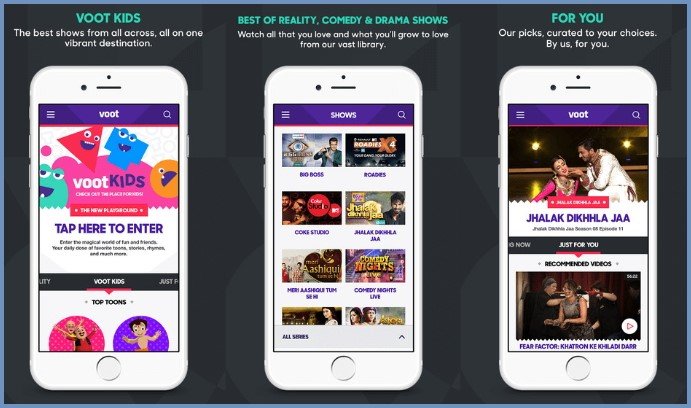
    If you’re looking for an alternative to Voot app and you are looking for an alternative to Voot app, then you’ve come to the right spot and download voot app for pc. The streaming app that is a hit has been used by millions of people to stream their preferred shows at their own pace. Although Voot offers a wide selection of shows, you’ll require a premium subscription to enjoy the majority of the premium shows. So, many users search for alternatives to Voot which could serve the same purpose, but without causing an expense to their pockets.

    6 Top Voot TV APP Alternatives You Can Make Use Of

    Here are a few of the top apps similar to Voot which can be its top alternative.

    1. Snaptube

    Snaptube is definitely one of the most popular apps similar to Voot which can be downloaded across all major Android devices. It’s a completely free application and doesn’t need users to purchase an annual subscription in order to benefit from its features. Because the app integrates several video hosting platforms it will not have difficulties in finding your favourite shows. It is a fast-loading player that can stream of HD content too. In addition to watching movies and shows it also lets you download unlimited videos to your device at no cost.

    1. Hotstar

    The company that owns it is Star Entertainment, Hotstar provides the ability to stream all of the most popular TV shows which are telecast on Star controlled channels. In addition to movies and TV shows you can also stream different sports events live on the application. One of the most popular apps, similar to Voot is that it can be downloaded from its website.

    1. HOOQ

    HOOQ is an operating model that is similar to Voot as well as Hotstar. It is with Sony Entertainment and WarnerMedia. It’s most popular across India, Philippines, Singapore and the other Asian countries. In addition to Indian content it also offers South East Asian as well as western films and shows on HOOQ, too.

    1. Sonylive

    SonyLIV is another application that is owned by Sony Entertainment. However, unlike HOOQ, it specifically targets its Indian users. The app offers a wide range of movies, TV shows and even ongoing tournaments for sports. In addition to the most popular TV shows, there are also numerous 90s-themed shows and also shows that are no longer telecast.

    1. Amazon Prime

    If you’re looking for new content that’s original and mixes well-known shows, you should join the Amazon Prime subscription. In addition to accessing an extensive collection of videos, you’ll also benefit from shopping on Amazon as well. With a Prime subscription, customers are in a position to access an extensive selection of original and exclusive TV movies and shows that you’d like to watch. This is the reason why Prime an exceptional application. Most popular apps that is similar to Voot.

    1. ThopTv for PC

    In the simplest sense, Thoptv is a free Android application that allows users to stream live TV streaming and sports, as well as web-series TV shows, and many more. While anyone can utilize the app, it’s to target Indian users who have an interest in watching movies. It lets you stream your favorite shows and shows on a variety of platforms like Hotstar, Netflix, Amazon Prime and more. The best aspect of this application is that it’s clearly categorised, making it simple to use by. There are many applications such as Hotstar, Pura TV etc. However download Thoptv for PC; this application stands out from the others due to its capabilities.

    Conclusion

    In the end, we’ve compiled all of the top options you can utilize and use instead in place of Voot app. These are all fully protected applications that provide you with completely free content and we also guarantee you of 100% security when using these applications. Download and use them all easily by clicking on the link beneath each suggestion.

  • Best 5 Live Streaming Apps for Android

    Best 5 Live Streaming Apps for Android

    The majority of the people are working hard to achieve great success in the entertainment sector. They want a good stage on which to display their abilities. They must conduct a significant field study to choose the ideal venue for presenting their skill. Live Streaming Apps for Android


    Live streaming apps for Android are an excellent way for these gifted individuals to exhibit their abilities. With a smart mobile device as a basic prerequisite, the performers will prove their talent. The most popular applications among all users are those that allow you to watch live streams.


    These mobile live-streaming apps for Android also provide live concerts by well-known musicians. All modern technological gadgets, such as Android tablets and iPads, may see the live broadcast.


    • Live Streaming Apps for Android


    1.Ustream


    One of the reliable apps on the list is this one. If Ustream starts up on your device, it will function normally. However, some individuals have difficulty beginning the program, so there’s a risk it won’t even start for you.


    Let’s speak about the app itself now that the performance is out of the way. Ustream interface is simple and very well. It doesn’t provide anything new, and it’s based on a template we’ve seen a million times before.


    You’ll be able to transmit from your phone or tablet with convenience. The controls aren’t as extensive as a professional streamer would want, but they’re sufficient for everyday use.

    2.Instagram Live Stories

    Instagram’s Live Stories feature was introduced in late 2016, and the app now has over 500 million daily active users. The Live Stories feature is posted in the Instagram app. A live streamer just snaps to the right on Instagram and clicks the “Live” option to stream a live video.


    Instagram Live stories, like Facebook and some of the other live-streaming apps we’ve covered on this list, let viewers connect with the live broadcaster by liking and commenting on the best live streaming apps for Android.


    1. Voot app

    Voot is a great app that provides the best Indian television shows to your phone. If you’re searching for an app that allows you to watch TV series and movies on your smartphone, you’ve come to the right place.


    Voot TV is a portable television system that may be used while traveling. It now has over 40,000 hours of content, much of which is centered on the famous Bollywood film genre. Nickelodeon, Colors Infinity, Colors Kannada, and Colors Bangla are just a few of the categories. Each of them may be chosen from a drop-down menu on the main page. This app also focuses on reality television shows, which is a great bonus for lovers of this particular sector. Download Voot App for PC and watch later while you are not connected to the internet.


    Voot is a wonderful app that allows you access to the latest TV content from the convenience of your smartphone, allowing you to stream your favorite shows whenever and anywhere you want.


    1. Periscope

    Periscope provides a larger reach, pun intended, if you are fairly popular or want to be the next big streamer. Following others is a lot of fun with this app because it has several cool features. I was shocked to see a large number of live presenters using the app.


    The app’s playback function is one of its greatest features. This function allows you to re-watch a live broadcast that has previously ended. It essentially creates the video and releases it to the internet for others to see at their convenience.


    You’ll also be able to stream to a select group of people and set up private broadcasts. If you’re broadcasting something for close friends and relatives and don’t want random internet users to peek, this option is fantastic. I enjoyed how the app displays live broadcasters on a globe map; this is a terrific way to quickly identify regional entertainment. When it comes to fantastic UI and design, Periscope tops the list.


    1. Pikashow app

    Download PikaShow App for PC is a wonderful third-party and multimedia live streaming platform for watching movies, TV series and live TV. The exciting feature is that the PikaShow software is available for free for Android users. 


    This Android software provides users with a completely safe and secure entertainment platform. It does not include any virus that might harm your computer. Furthermore, it is lawful and ideal software. This PikaShow app is not associated with any unlawful activity. As a result, you may install and enjoy the items without hesitation.


    PikaShow’s useful features and functions include:

    • Support Chromecast enables you to stream video from your phone or tablet to a big-screen TV.
    • HD video files (from 140p to 1080p), Full HD video, 2K HD video, 4K video, and Ultra HD video
    • Sports, movies, TV shows, news, drama, and other categories
    • Many genres such as humor, romance, action, adventure, and so on are accessible.
    • It’s a simple application. It does not take up a lot of memory on your phone.
    • There are almost 50 live TV stations that can choose from.
    • You will be notified about future entertainment content.
    • Subtitles for movies must be allowed.
    • There will be no buffering and the streaming will be fast.
    • A massive library with research and evaluation categories.


    PikaShow is a terrific software that gives you endless fun by allowing you to search for and locate your favorite brands all in one position. If you use the app as your source of pleasure, you can be confident that you will never be bored.


    Conclusion

    This completes our list of the top best live streaming apps for Android. I know there are a couple of others on the Google Play Store, but they all crashed for me either right away or when I tried to start the broadcasts. I strongly advise you to download at least two of the applications on this list and keep them on your phone in case one of them malfunctions.


    Apps for live streaming are only available on mobile devices. Using live-streaming apps for Android, you can reach an infinite number of people. These live streaming apps for Android may also be employed to boost your income and help you better your financial position. These live streaming apps may also be applied for successful product branding.

  • Area Rug Cleaning – Basic to Advance

    Area Rug Cleaning – Basic to Advance

    Area rugs add warmth to flooring, add color and pattern to a room, and establish zones in your living area. However, stains and dirt frequently accompany area rugs, so knowing how to clean an area rug is essential.

    The first step in cleaning an area rug is to figure out what kind of material it is made of. This is critical for extending the life of the rug, since different materials necessitate different area rug cleaning procedures and products. Our helpful area rug cleaning guide will walk you through the various types of rugs and provide you with suggestions and techniques for cleaning and stain removal.

    Rug Cleaning Basics

    The best approach to clean an area rug is determined on its size, structure, and material. Large area rugs should be treated as if they were a wall-to-wall carpet. As a result, the following care regimen will help the majority of rugs:

    • Vacuum big area rugs to eliminate dirt: Vacuuming is the most crucial area rug cleaning process, just as it is with carpet. Vacuum both sides of a reversible rug. This gets rid of the dirt and filth that might cause your carpeting to wear out prematurely. Make sure not to vacuum any of the fringe. (When vacuuming a shag rug, turn off the beater bar to avoid tangling the long fibers.)
    • Remove pet hair with a brush: A vacuum can often leave pet hair behind. Remove the hair using a hard brush, combing in the direction of the rug’s nap.
    • Turn rugs once a year: Area rugs are subjected to increased wear and tear from foot activity and the sun. To level out the wear, turn them once or twice a year.
    • Shake small area rugs: If the rug is small enough, shake it or beat it violently outside to remove dirt and grit. Shaking carpets outside is prohibited in certain regions, so check your local laws first.

    Material-by-Material Guide to Rug Cleaning

    Rugs of particular varieties require unique cleaning techniques. Care tags should be kept on the rug for easy reference. Pay special attention to the manufacturer’s instructions for deep rug cleaning the rug and utilizing a rug shampooer or cleaning equipment. Take care of specialty rugs by following these guidelines.

    Rugs that are woven or braided can be cleaned in a variety of ways.

    Before and after washing, inspect rugs for stitching breaks. Check the labels on little braided rugs to see if they may be washed. Place them in a zipped pillowcase or mesh laundry bag if they are. Rinse carefully after washing in cold water on a moderate cycle. Dry on a low putting in the tumble dryer.

    Throw huge braided rugs on a vinyl or concrete floor, or place an old blanket beneath them, to clean them. Using a sponge, apply industrial rug cleaning foam to the surface and rub it in according to the manufacturer’s instructions. Rinse or vacuum the area to finish. Before putting the rug back on the floor, ensure sure it is thoroughly dry.

    How to Clean Oriental, Antique, and Hand-Knotted Rugs

    Antique and Persian runners are popular options for kitchens and other high-traffic areas, but they may require additional care. Vacuum a new Oriental rug in the same way you would a carpet or a wool area rug. When it comes to vintage or antique rugs, take extra precautions. Place a piece of nylon screen over the rug and weight it down with books or bricks to protect them from the vacuum. Using a vacuum cleaner, clean the screen. Alternatively, tie a piece of nylon mesh ($5) over the vacuum attachment and replace it as dirt builds. Once a year, get these rugs professionally cleaned. Rotate rugs to maintain even wear; direct sun exposure will fade them.

    Bonus Tip

    When buying antique carpets, find out as much as you can about the fibre content and manufacturing from the vendor. Request advice on how to take care of your pet.

    Coir, Sisal, Rush, and Grass Rug Cleaning

    Natural fiber rugs, such as coir, sisal, rush, and grass, have an open weave that enables dirt to filter through to the floor underneath them. They’re popular for mudroom rugs and welcome mats. Vacuum on a regular basis, removing the rug from time to time to vacuum the floor beneath it. If your rug is reversible, flip it every time you clean to ensure even wear.

    Leave a room-size natural-fiber rug in situ to clear stains or discolorations. A plastic drop cloth and a towel are used to protect the floor underneath it. Using a gentle brush soaked in soapy water, scrub the spots. Rinse well with clean water. Cover the damp area with a towel. Dry the cleaned area as much as possible using a blotter. To speed up the drying process, use a handheld fan or a hair dryer. To clean tiny carpets, place them on a covered table or counter. Water weakens the fibres, so work swiftly and carefully to ensure that these carpets last as long as possible.

    Sewn-together squares are used to make some natural-fiber carpets. Purchase a few more squares or a rug in a lesser size. If a rug square gets permanently soiled, cut the threads holding it together and replace it with a fresh square. Use heavy-duty carpet thread to hand-stitch it in place.

    Rug Cleaning Sheepskin, Fur, and Hair-on Hides

    Leave unscented talcum powder on fur, sheepskin, and hair-on-hide carpets for many hours after shaking. Shake out the talcum powder after brushing it through the hair. Depending on the length of the fur, repeat this step numerous times. Use a clean cotton towel bathed in lukewarm soapy water to clean the back of this sort of carpeting. Remove any dirt or spills using a damp cloth. Allow to dry thoroughly before reinstalling with a clean towel soaked in clean water.

    How to Thoroughly Clean Rugs

    Check the care label on a small rug to see if it should be dry-cleaned, spot-cleaned, or washed. It’s possible that a rug labelled “dry cleaning only” isn’t colorfast. Perform a test prior to spot rug cleaning in Melbourne. If a rug can be washed, do so on the gentle cycle in the washer. To prevent tangling, divide the fringe into many hanks and wrap each one with white string. Put the rug in a mesh washing bag or a zipped pillowcase and wash it in cold water on the gentle cycle to protect it from the agitator.

    Wet rugs can be hung on a porch, patio, or breezeway over a clothes dryer, a slatted picnic table, or a stack of bricks. If a wet rug is hung over a single clothesline, its shape will be distorted as it dries. To preserve small rugs made of synthetic fibres that resemble carpeting, place them on a small worktable or counter and dry them with a drop cloth, old sheets, or towels.

    Every 12-18 months, a thorough are rug cleaning is recommended. When using industrial rug cleaning products for the first time, test a small section of the rug to ensure it is colorfast and unaffected. Apply rug cleaning foam to a large rug on a vinyl or concrete surface and rub it in according to the manufacturer’s instructions. To finish, rinse or vacuum the area. Make sure the rug is completely dry before reinstalling it.

    Dry-cleaning may be an option for small to medium-sized rugs; check the labels for care instructions.

    How to Remove Stains from Rugs

    When your rug becomes soiled, you must act quickly. Always remember to blot, not rub, stains and rug cleaning spills as soon as possible.

    • Combine 1 teaspoon liquid dish detergent, 1 quart warm water, and 1/4 teaspoon white vinegar to clean alcoholic and soft beverages. Spray the stain with the solution, then rinse and blot dry.
    • Coffee or tea stains: saturate the stain with the detergent mixture, rinse, and blot. If a stain persists, use a commercial spot carpet cleaner.
    • Fat-based stains: For meals containing butter, margarine, or gravy, use a dry-solvent spot rug cleaning.
    • Gum: Remove as much as you can, then use ice cubes in a plastic bag to solidify any remaining gum. Scrape the gum away with a spoon or a dull knife. Vacuum and spot clean with a dry-solvent if necessary.
    • Paint: For acrylic and latex paint, spot-clean with the detergent solution while the stain is still wet. If the stain persists, remove it with rubbing alcohol. Over oil-based paint, sponge unscented mineral spirits ($7, The Home Depot), being careful not to soak through to the backing.
    • Wet a sponge with cold water and dab it with a detergent solution or citrus-oxygen cleaner to clean tomato sauce. Rinse and blot until completely dry with a solution of 1 cup white vinegar and 2 cups water.
    • Wipe urine, feces, and vomit with a detergent solution or a citrus-oxygen cleanser until dry.
    • Melted wax: Freeze it in a plastic bag and scrape it off in the same way you would gum. To remove any remaining wax, blot with a clean white cloth or cotton ball dampened with rubbing alcohol.
  • Basic Educational Requirements of Network Analysts

    Basic Educational Requirements of Network Analysts

    Network Analysts Careers – Complete Career Guide

    You can leverage the experience of our talent acquisition platform for your staffing and career development needs. As a full-service IT staffing and recruiting firm specializing in cybersecurity, the Field Engineer platform can scale its services to meet our clients’ needs.

    • Skills in information security include security analyst, technical manager, CISO, director of security, penetration tester.
    • Cyber security skills include forensic analysts, vulnerability researchers, and computer crime investigators.
    • Network infrastructure includes systems engineers, network analysts, and network engineers.

    What is a Network Analyst?

    There are many fields of work that have a connection to computer networks, and Network Analysis is used to describe several of them. But Network Analysts are responsible for the core of Network Analysis.

    There are many types of networks, including the Internet, intranets, local area networks, and wide-area networks. In addition to analyzing and configuring network components, they install, layout, and maintain them. Besides installing and configuring, they also need to upgrade their system networks daily to make sure that they function properly. An already established network system may experience technical problems, which they must analyze and resolve.

    Job description for network analysts

    You will be responsible for installing, laying out, and maintaining all network components within an organization.

    Most network analysts become involved in both the technical and business sides of a company. Identifying problems within the organization and identifying a suitable technical solution is therefore necessary.

    Plans, designs, analyzes and provides technical support for the company’s data communication networks. Research and evaluation of network technology can also be performed, as well as recommendations for purchasing network equipment.

    Typical employers include large retail chains, government departments, or financial institutions. An IT company specializing in troubleshooting projects would be another option.

    Depending on the type of organization you work for, you might be tasked with restructuring a bank’s customer accounts to improve security or integrating phone and internet systems to improve the efficiency of a call center.

    In most cases, you will work with a team of programmers, designers, and IT managers to design systems. The level of responsibility you hold may determine whether you supervise the installation, test, and evaluate the success of the networks, and ensure all necessary staff has been trained to use them properly.

    Network Analyst Education Requirements

    Applicants to small-sized companies can apply with an associate’s degree in the Network Analysis career path. Most large companies, however, require a bachelor’s degree in computer science, information technology, or a related field. The following are some reputable schools that offer degree programs in computer science and IT.

    Education at the undergraduate level
    • The University of Hertfordshire in the United Kingdom – BSc (Hons) Computer Science.

    Individuals who are interested in technology and software development and how these can benefit others should consider the program. There are core topics in this program such as foundations of computation, programming, multimedia, networks, databases, operating systems, software engineering, and professional issues. Student tuition is £13000, with a full-time 3-year course duration or 4-year course duration with a placement.

    • Marshall University in the United States of America – Bachelor of Science in Computer Science.

    Using a practice-based and theoretical approach, the program prepares students for careers in Computer Science. You will learn how to analyze, design, build, test, and deploy computer-based systems by making technical trade-offs between performance, scalability, availability, reliability, security, maintainability, cost, and societal impact. Students at the university are able to use the university’s state-of-the-art computing facilities. International students are charged $9,853 per semester.

    • Debrecen University in Hungary – Bachelor of Science in Computer Science.

    Students in this program are trained as IT professionals and gain solid theoretical knowledge to further their careers. This will help them attain advanced performance capabilities in the future. They will also gain a better understanding of the typical software-oriented development process. In addition, graduates are able to work independently or as part of a team on tasks related to IT equipment and systems. There are six semesters in the program. It costs $6000 per year for international students.

    Network analysts do not have entry-level positions in any organization. In the beginning, you will be an associate, a technician, a help desk associate, or a trouble-shooter, and after gaining three years of experience, you will become a Network Analyst.

    Network analyst job requirements for entry-level positions

    Having a degree in computer science or business information, along with experience in a related field of IT, is necessary to be a network analyst.

    In addition, you can take a postgraduate conversion degree to enhance your technical skills and qualifications.

    You can become a network analyst by starting as a trainee programmer, or something similar, and working your way up to the position.

    Training to become a network analyst

    You’ll most likely have an intensive period of training when you start as a network analyst so that you are familiar with the entire network and the needs of the company. A systems analyst training program is also possible.

    Since the IT industry moves and changes so quickly, you will constantly be required to update your skills and knowledge.

    There are some courses offered in-house, but many are external courses that can lead to professional qualifications from organizations such as the British Computer Society, e-Skills, or the Institute of Information Systems.

     Network analysts’ working hours and work environment

    As a network analyst, you may work 37 to 40 hours a week, but occasionally you may need to work late to update or maintain systems. During normal business hours, this can often be difficult without disrupting the rest of the operation.

    The majority of your work will be done in an office, either at your desk or at clients’ offices. Working for clients might require you to travel for short periods away from home, but it depends on where the client is located. It may be overseas in some cases.

    At times, it may be possible to work from home, but this will depend on the employer’s preferences.

    Network analyst salary average

    The average salary of a newly qualified network analyst is approximately £25,000 per year. Eventually, your annual earnings will increase to nearer £40,000, and after several years, you could earn up to £58,000.

    Job postings for Network Analyst

    Network analysts are one of the fastest-growing professions in the tech industry. They work with a variety of industries and projects, including retail, government, and healthcare.

    Recruiting network analysts at the field engineer platform

    Network Analysts can then reach out to those employers who are seeking candidates with appropriate skills. This platform has over 60,000 engineers in more than 195 countries, making it one of the biggest and most convenient platforms for employers looking for people in specialty occupations.

  • Top 10 Uses Of Python

    Top 10 Uses Of Python

    Check out some of Python’s main uses as we explore why it is such a popular and diverse programming language. Today Python is one of the most popular and widely used programming languages ​​in the world.


    What is Python?

    As we highlighted in our recap article on the uses of various programming languages, Python is a high-level (easier for humans to understand) object-oriented (data-oriented) programming language. It was first published in 1992 and is designed to be relatively intuitive to write and understand. As such, it is an ideal programming language for those who want rapid development.

    If you ask yourself who is using Python, you’ll find that many of the biggest companies in the world are implementing it in one form or another. NASA, Netflix, Google, Spotify, and many others use the language to run their services.


    What is Python used for? Top 10 Uses of Python

    Python is a popular and required skill to learn. But what is Python programming used for? Python can be used to:


    1. AI and Machine Learning 

    Python is a stable, simple, and flexible programming language. This makes it perfect for many machine learning (ML) and artificial intelligence (AI) projects. Python is one of the languages ​​of choice for data scientists, and there are many Python libraries and packages available for machine learning and AI.


    1. Data analysis

    Like AI and machine learning, data analysis is another rapidly evolving area that uses Python programming. At a time when we are creating more data than ever before, there is a need for those who can collect, manipulate and organize the information.

    Python for science and data analysis makes sense. The language is easy to learn, flexible, and well supported, which means it can be used relatively quickly and easily to analyze data.


    1. Data visualization

    Another area of ​​popular and developing interest is data visualization. This also shows many of Python’s strengths. In addition to its flexibility and open source, Python offers a variety of graphical libraries with all possible functions.

    Whether you want a simple graphical representation or a more interactive representation, you can find a library that meets your needs. Examples are Pandas Visualization and Plotly. The possibilities are huge and allow you to turn data into meaningful information.


    1. Application programming

    You can program all kinds of apps using Python. Universal language can be used to read and create directories, create GUIs and APIs, and so on. You can build machine learning app, audio and video app, or blockchain apps all with Python.


    1. Web development

    Python is a great choice for web development. This is mainly because there are many Python web development frameworks to choose from, such as B. Django, Pyramid, and Flask. These frameworks were used to build sites and services like Spotify, Reddit, and Mozilla.

    Thanks to the extensive libraries and modules provided with Python frameworks, functions such as database access, content management, and data authorization are possible and easily accessible. Given its versatility, it’s no surprise that Python is so widely used in web development.


    1. Game development

    While Python is far from an industry-standard in game development, it is used in the industry. The programming language can be used to create simple games, which means it can be a useful tool to quickly develop a prototype. Some functions (like creating a dialog tree) are also possible in Python.

    If you’re new to Python or game development, you can also learn how to create a text-based game in Python. You can work on different skills and improve your knowledge in different areas.


    1. Language development

    Python’s simple, elegant syntax has inspired the development of new programming languages. Languages ​​like Cobra, CoffeeScript, and Go use Python-like syntax.


    1. Finances

    Python is progressively used in the financial world, frequently in areas such as qualitative and quantitative analysis. It can be a valuable tool for determining asset price trends and projections, as well as for automating workflows between different data sources.

    Python is an absolute tool for working with big data sets and there are several libraries accessible to help procedure and compile information. As such, it is one of the preferred languages ​​in the financial industry.


    1. SEO

    Another somewhat surprising entry in this list of uses for Python is in the area of ​​search engine optimization (SEO). This is an area that often benefits from automation, which is a certainly possible thanks to Python. Python can help in implementing changes across multiple pages or categorizing keywords.

    Emerging technologies like Natural Language Processing (NLP) should also be relevant to the SEO team.


    1. Design

    Python programming language can be used to develop graphic design applications. Surprisingly, Python is used in much 2D imaging software such as Paint Shop Pro and Gimp.

    Python language is so versatile that it is used in developing 3D animation software like Blender, Lightwave, and Cinema 4D.


    Summary

    This concludes our review of the use of Python programming. There are many reasons to learn Python. It’s an evolving and in-demand skill, needed in all types of industries. Visit Python Classes In Pune

  • What Is A Good B2B LinkedIn Lead Generation Technique?

    What Is A Good B2B LinkedIn Lead Generation Technique?

    Why LinkedIn Is Important For B2B Business & Lead Generation?

    To survive an online b2b business, you always need data of customers to contact them. If you have data of customers, you can sell your products or services, and if you don’t then you can’t stay in business. A great sales team can help a lot to grow a business, but a sales team is nothing without data. Because every sale starts with one thing …LEADS.

    If you want to collect business leads from LinkedIn and your customers are businesses then LinkedIn is the best platform for you. LinkedIn is a social media website filled with valuable business information, millions of businesses registered on LinkedIn from different countries and industries. You can get business details from LinkedIn like company title, phone number, email address, website link, business location, rating, reviews, and more just by LinkedIn data scraping for your business keywords and locations.

    What Is The Best B2B Lead Generation Technique To Get Data From LinkedIn?

    There are many techniques and tools to find and get data from LinkedIn for marketing purposes. By knowing the contact details of your customers, you can contact them directly to sell anything. But the question here is, how do you collect the b2b leads data from LinkedIn in a usable format? You have three options here:

    Search For Data Manually:

    You can search for targeted businesses on LinkedIn and create your own business database by copying and pasting the data because unfortunately there is no option in LinkedIn to download the data to an Excel spreadsheet. So, it may be a boring and time-consuming task.

    LinkedIn Lead Generation Tools

    The second method is to use LinkedIn lead generation tools that allow users to extract b2b leads data for targeted keywords, industry, and country from LinkedIn and export it to an Excel spreadsheet. This may be helpful for many different marketing campaigns.

    Buy Data

    The third method is to purchase data from data-providing companies and freelancers. It is the easiest and fastest way to get b2b leads data. But, it may be irrelevant, outdated, and costly. You have to pay them a heavy amount for different industries’ data, while with LinkedIn Lead generation tools, you can get data for any industry and country with one month payment.

    What Is The Best LinkedIn Lead Generation Tool To Extract/Download LinkedIn Data?

    There are many LinkedIn Email Scraping tools available in the market, but choosing the best LinkedIn Data Extractor can be difficult and can affect your business.  Many tools require skills to operate, but if you are looking for a coding-free LinkedIn Scraper software that is easy to use and capable of ‘extracting the data with a few simple clicks and browsing all the LinkedIn, then you should try this LinkedIn Company Data Extractor.

    LinkedIn Company Extractor is the best choice for your b2b business and marketing campaigns because it is free to download and install. LinkedIn Data Scraper can extract business data from LinkedIn for free in its free version but unfortunately can’t export data in the free version. The Licensed LinkedIn Company Scraper allows you to export data in many different formats like CSV, Excel, and Text files. By using LinkedIn Email Finder, you can extract the following business data from LinkedIn Company Pages and Groups:

    • Business Title
    • Business Address, Zip Code, Country, & City
    • Telephone, Mobile, Fax Number
    • Website Links
    • Business Emails
    • Business Ratings & Reviews
    • Business Staff
    • Of Followers
    • Established Date
    • Business Description
    • Image Links and much more…

    This is some field data that you can extract from LinkedIn, but if you are looking to extract data for a specific industry and country, you can apply the filter as well. Before data extraction like if you are interested in email scraping will work as a LinkedIn Email Extractor which will only extract business emails from LinkedIn with its personalized function.

    Main Advantages Of LinkedIn Company Extractor Software

    • Extract business data like emails and phone numbers and initiate email and telemarketing campaigns for your business.
    • Get valid business-to-business data from LinkedIn to contact them and increase sales and ROI.
    • Export data from LinkedIn to an Excel spreadsheet or CSV form.
    • Earn money selling leads to b2b businesses and marketers.
    • It’s a desktop application with the Chrome browser supported by all the latest and older versions of windows.
    • You can apply filters when searching for data on LinkedIn because it supports all searching options supported by LinkedIn.
    • Automatically save search history
    • No coding – No Blocking
  • How to Find the Best Time Tracking Tool

    How to Find the Best Time Tracking Tool

    Why is a time tracking software important?

    Time tracking software is a valuable tool for any business. It is the only way to know how productive your employees are and what tasks they are focusing on.

    Traditional time tracking software was designed to not be complicated for employees, but it didn’t have the necessary features that would help managers understand their team’s performance. But with new technologies, time tracking software is looking more like personal time trackers and desktop timers. They are now more accurate, easy-to-use, and have an extensive range of features that can be tailored to your needs.

    Time tracking is an important aspect that should be taken into account when managing projects. It’s not just about knowing how much time you spend working on a certain task, it also helps you understand where your time is allocated across the day. Tracking time also helps professionals better estimate the workload and avoid overworking themselves. The act of tracking time can be done manually or with the help of software. A good time tracking software will allow you to track your activities in real-time and to measure your productivity over a longer period of time, usually by week or month. With this data available, people are able to set realistic deadlines and work out how much they need to invest in their work day-to-day to achieve their goals.


    It’s All About You and Your Productivity

    It’s not easy to maintain a high level of productivity, but it is possible. These tips will help you to boost creativity and focus, so you can do more in less time.

    It is important to understand the difference between productivity and efficiency. Productivity is about doing more with less time, while efficiency is about doing the same amount of work in less time.

    One way to improve your productivity is by getting enough sleep. You might think that sleeping for an hour or two won’t make much of a difference, but it will actually give you enough energy that you need for your entire day.

    There are also apps that can help you boost your creativity and focus by blocking distracting websites or limiting the amount of screens open at once on your computer screen. For instance,

    Productivity is the key to success in today’s workplace. In this article, we will discuss ways that you can improve your productivity and increase your focus.

    If you are looking for a way to boost creativity, it may be time to take a break from the computer. Even taking a break from work for just five minutes per hour can boost creativity.

    Do not neglect the importance of mental health when trying to boost productivity in the workplace. Take care of yourself in order to be able to take care of others in a better way!


    What is the Difference Between Time Tracking Applications?

    There are many time tracking applications out there to choose from and all of them have different features. But what is the difference between these apps?

    Some companies use employee monitoring software to track employees’ activities and productivity. This software is used for internal purposes only, as it provides access to a company’s own employees. While other companies use project management software that enables them to manage projects and resources, even if they are outsourced or contracted from other agencies. For example, some times tracking apps can be integrated with payroll integrations and project management software. Some also offer the ability to track workflows and constant updates of what employees are working on at any point in time.


    Best Time Tracking Software for Small Businesses


    Time Tracking Software for Small Businesses is a tool that can be used effectively to understand where the business stands in terms of productivity. With the help of this small business tool, managers will be able to monitor employee time, track their time spent on tasks, identify productivity gaps and assess weaknesses in processes. -Heather Schoening

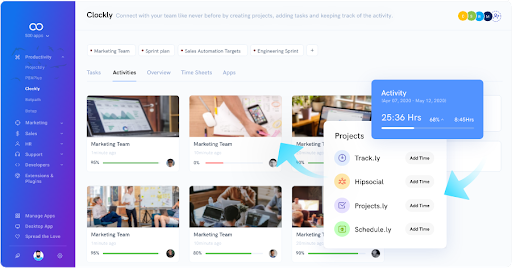
    Time Tracking The ability of Clockly to monitor your employees’ productivity, in addition to its strong automatic time tracking, sets it apart from the competition. It provides screenshots of activity as well as active and idle time measurement to ensure that your staff is working and to identify who may want assistance with their job. It also includes online timesheets, customer invoicing, and payroll connection, allowing you to handle everything in one place. Integration with other 500apps productivity software solutions gives you the option of having a complete, all-in-one workforce management solution.

    Conclusion: 

    It is important to track your time with a system that is effective and easy to use. Time tracking software is a time management tool, which is commonly used by freelancers, small businesses, or those at home. Some may find it complicated to operate, but there are several software available that makes it easy. Here’s how: Choose the right software for you: There are many options for time tracking software and each of them has its own advantages and disadvantages. Find one that best suits you and your business needs.